
1v1 lol

1v1 lol
Similar Games
































Game Description
Play 1V1 LOL online for free and jump straight into fast duels where building is just as important as shooting. You face another player in a small arena and can instantly place walls, ramps, and floors to gain cover or high ground.
Each round feels like a quick, creative battle. One moment you line up a shot, and the next you are building a tower for a better angle. The clean graphics keep everything easy to see so you can focus on aiming, building, and winning.
It’s perfect for players who enjoy action and strategy. Every match is a fresh test of your reflexes and building skills.
About 1V1 LOL
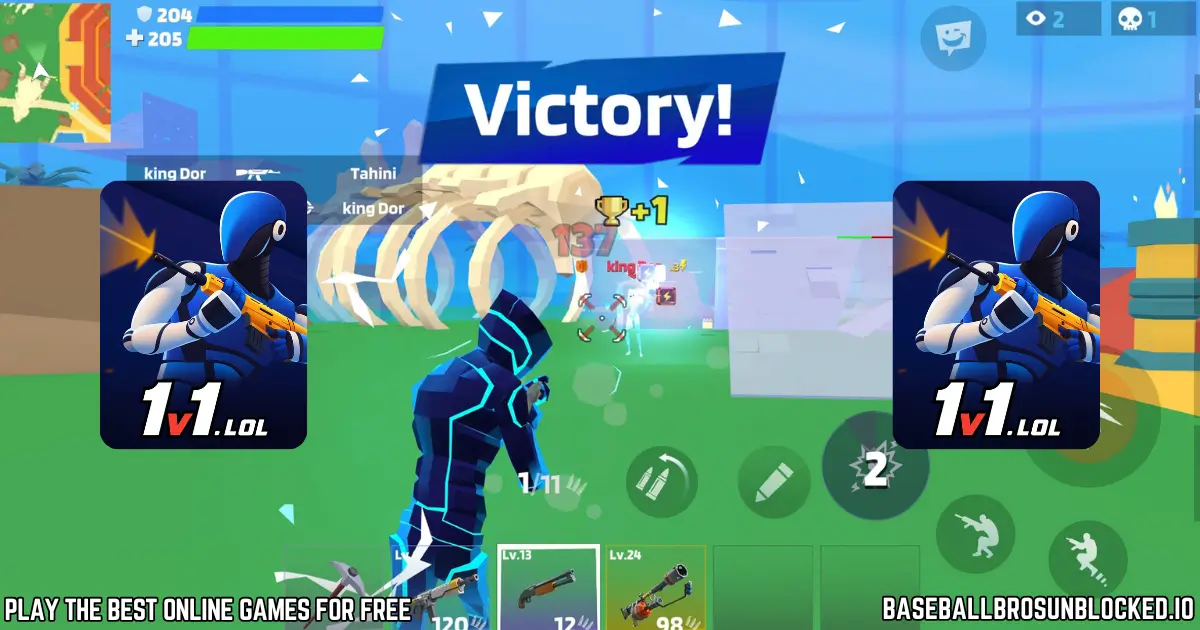
1V1 LOL is an online third-person shooter mixed with tactical building. Your goal is simple: eliminate your opponent using fast construction and accurate shooting.
The game was created by developer Lior Alterman and released in January 2020. It became popular for offering Fortnite-style building mechanics in a simple, browser-friendly form.
Instead of long battle royale matches, 1V1 LOL focuses on short, intense fights where skill decides the winner quickly.
Gameplay
Gameplay combines fast shooting with instant building. You can place walls, ramps, floors, and roofs at any moment to block shots or reach better firing angles.
Classic 1v1 duels end when one player is eliminated. Other modes include 2v2 box fights and a compact Battle Royale with up to 10 players.
Winning requires switching between offense and defense, reacting quickly, and using both weapons and builds to outsmart opponents.
Platform
You can play 1V1 LOL directly in your browser without downloading anything. It works smoothly on PCs, laptops, and Chromebooks using Chrome, Firefox, Edge, or Safari.
The game is also available on mobile and other platforms, so you can practice anywhere.
How to Play 1V1 LOL Online
Play 1V1 LOL for free on baseballbrosunblocked.io and join a match instantly with no signup needed.
Start Your First Match
Select a mode and the game will match you with an opponent right away. Your goal: eliminate them before they eliminate you.
Build for Advantage
Place walls and ramps immediately to gain protection and the high ground. A higher angle makes it easier to track and hit your opponent.
Fight and Win
Use the right weapon for each situation. The shotgun excels up close, while rifles are stronger at mid-to-long range. Keep moving and building to stay safe.
Controls
- Desktop : Move with WASD and aim with the mouse. Switch weapons and building tools using number keys or custom keybinds.
- Mobile / Touch : Use the on-screen joystick to move, swipe to aim, and tap to shoot or place building pieces.
Tips and Tricks to Master 1V1 LOL
- Practice in JustBuild : Train your building speed without enemies.
- Get High Ground : Build fast ramps to gain an advantage.
- Build a Box : When under pressure, box up for instant protection.
- Edit Structures : Edit walls to create windows for surprise shots.
- Weapon Mastery : Use shotguns for close range and rifles for distance.
- Break Enemy Builds : Use your axe to destroy their defenses.
- Customize Controls : Set keybinds that help you build faster.
Features of 1V1 LOL
- Multiple Modes : 1v1 duels, 2v2 box fights, and 10-player Battle Royale.
- Training Modes : JustBuild and Aim Trainer for skill improvement.
- Private Matches : Create rooms and invite friends.
- Instant Building : Place walls, floors, ramps, and roofs instantly.
- Custom Controls : Adjust keybinds and sensitivity.
- Skins & Cosmetics : Unlock new character looks.
- Cross-Platform : Play on browser, mobile, and Steam.
- No Downloads : Runs instantly in any modern browser.
1v1.lol Online
1v1 Lol is a fast online building and shooting game you can play right in your browser. There are no downloads, so you jump into a match in seconds and start building, battling, and having fun. 🎮
On our website, you always get the latest version of 1v1.lol Unblocked for free. Just click to play, choose your mode, and see how long you can survive against other players in this skill-based arena.
All Game Modes In 1v1.lol Explained
1v1.lol has many game modes so you never get bored. Some modes are perfect for practice, while others are made for intense fights and quick wins.
Whether you like pure duels, team battles, or training, there is always a way to play. Many kids discover new favorites as they try each mode in this exciting 1v1.lol – Battle Royale Game.
1v1 Competitive
In the classic 1v1 mode, you face a single opponent in a fast duel. The goal is simple but intense: be the last one standing using smart building, quick edits, and sharp aim.
This mode is great for players coming from games like Fortnite or Lol 1v1 style shooters. Every move matters, and each round is a fresh chance to win.
BR Duos (2v2 Battle Royale)
BR Duos is a 2v2 battle royale mode where you team up with a friend or a random player. You must work together to build, rotate, and take smart fights.
Communication and teamwork are key here. Good duos share materials, protect each other, and use buildings to control the battlefield.
Box 2v2
Box 2v2 drops two teams into a small box-shaped arena. Fights start instantly, so there is no time to warm up or hide.
Quick editing, tight movement, and strong shotgun aim decide the winner. This mode is ideal if you want fast, close-range action.
Practice And Fun Modes
- JustBuild: A calm mode with no weapons or enemies, where you can practice builds and edits without pressure.
- Aim Trainer: A special mode that helps you practice tracking, flicks, and fast shots to improve your aim.
- Party Mode: Create or join a private lobby using a code and play only with your friends in any mode you like.
Building Strategies For Beginners
Building is the heart of 1v1 Lol Game, and learning a few simple moves can change your matches completely. Even new players can survive longer with smart builds. 🧱
The first thing to learn is the basic “box.” When someone shoots at you, quickly place four walls, a floor, and a roof around yourself. This tiny fort gives you time to reload, heal, or plan your next move.
Next, practice placing ramps to gain high ground. Building a ramp and a wall in front of it keeps you safe while you climb. From above, it is easier to see enemies and harder for them to hit you.
Many players coming from 1v1 Io or similar games quickly see how important high ground is. Build smart, move fast, and never stand still in the open.
Mastering The Building Mechanics
Once your basic box and ramp skills feel comfortable, you can move to more advanced building. The goal is to create cover while staying one step ahead of your opponent.
A popular trick is the “90.” You jump, turn, and place walls and ramps in a tight spiral, climbing straight up while staying protected. This is one of the fastest ways to gain height in 1v1 Lol Unblocked.
Practice placing walls the moment you take damage. This habit makes you harder to hit and lets you control where the fight happens.
Combining ramps, floors, and walls into smooth patterns will make your gameplay feel faster, just like pro players on 1v1.lol Github clips or highlight videos.
Advanced Building And Editing Strategies
After you feel confident with simple builds, editing takes your skills to the next level. Editing lets you change your structures to surprise enemies and create new angles.
Learn simple edits first, like opening a small window in a wall to fire a quick shot, then closing it again for safety. You can also edit doors and arches to move through builds without breaking them.
Advanced players in modes like Zone Wars often use “90s” and fast edits together. With practice in JustBuild or OpenProcessing 1v1 Lol style maps, you can build towers, tunnels, and safe paths while fighting.
Spend a few minutes each day practicing edits in a calm mode. Over time, your fingers will remember the patterns, and your hands will move automatically during real fights.
Weapon Guide: When To Use Each Gun
- Shotgun: Use in close-range fights, especially inside boxes or tight corners. One good shot can decide the battle.
- Assault Rifle: Best for medium range and for breaking walls, ramps, and roofs your opponent builds.
- Sniper Rifle: Use from far away when enemies stand still or peek slowly. It rewards patience and accuracy.
Playing 1v1.lol With Friends
Playing with friends in 1v1 Lol.me style lobbies makes the game even more fun. Party mode lets you set up private matches in just a few clicks. 😊
From the main menu, choose “Party,” then create a party to get a special code. Share this code with your friends so they can join.
Once everyone is in the lobby, you can pick any game mode, from simple 1v1 duels to Box 2v2. It is perfect for friendly battles, small tournaments, or training as a team.
Battle Royale, Box Fights, and Zone Wars Tips
Battle Royale mode in 1v1.lol Unblocked 76 feels different from a simple duel because there are more players. Try not to fight too early, and save your materials for the final circles.
Stay aware of every sound around you. Listen for footsteps, building, and shots to guess where others are hiding.
In Box Fights, matches happen in tiny spaces where editing and shotgun aim matter most. Try to take control of your opponent’s wall, then edit a quick window or door for a surprise attack.
Zone Wars copies the endgame of a big battle royale. The storm closes in, forcing players closer together. You must build while moving, protect yourself, and look for safe angles to attack.
Play 1v1.lol Unblocked At School
Many players search for terms like “1v1 lol classroom 6x,” “1v1.lol Unblocked 6x,” or “Unblocked 1v1 Lol” to find versions that work on school networks.
Sometimes schools block normal gaming sites but allow other platforms. That is why you might see 1v1 .lol Unblocked, 1v1.lol Unblocked Wtf, or 1v1.lol Unblocked Github on different websites.
Always follow your school’s rules when you play. Use free time or breaks, and never ignore homework or class just for a match.
Tips For Playing On A Chromebook Or School Computer
Because it runs in a browser, 1v1.lol Unblocked works well on most school Chromebooks and basic computers. This makes it a popular choice for short breaks.
To get smoother gameplay, close other tabs and apps so your device can focus on the game. Using a USB mouse instead of the trackpad makes aiming and building much easier.
Customizing Your Character
You can also customize how your character looks in 1v1-lol. Different skins, outfits, and items let you create a unique look for every match.
These items can be unlocked or bought, but they never change your damage or speed. Victory still depends only on your skills, not your skin.
Parent Guide For 1v1.lol
For parents, 1v1.lol Game Online is a competitive shooter, but the style is cartoony and not realistic. There is no blood or gore, and colors are bright and playful.
Matches feel more like digital laser tag than a serious war game. Kids focus on building and strategy instead of scary scenes.
There is limited communication with strangers, and most of the time, players just battle and then queue for the next round.
As with any online game, parents can try a few matches themselves and decide what feels right for their family.
Download 1V1 LOL
As of late 2025, 1V1 LOL is no longer available on Google Play or the Apple App Store. The developer, JustPlay.LOL, removed the mobile versions shortly before shutting down all official servers.
On November 3, 2025, the game was fully discontinued across every platform — including Android, iOS, Steam, and browser. Because the servers are offline, older mobile versions can no longer connect or function normally.
While the original app store downloads are gone, you can still play a preserved browser version here on our website for fans who want to enjoy the gameplay one last time.
Game Details
Requirements
1V1 LOL runs directly in your browser and works smoothly on most modern devices. For the best performance, use an updated version of Chrome, Firefox, Edge, or Safari on a desktop, laptop, or Chromebook.
The mobile browser version also works, but using the official Android or iOS app provides better touch controls and smoother build placement.
Developer
1V1 LOL was created by developer Lior Alterman, known for bringing fast, creative building mechanics to simple browser games.
Its clean design and quick matchmaking helped it grow into one of the most popular online building shooters for students, casual players, and competitive fans.
Category
- Shooter Games
- Battle Royale Games
- Building Games
Technology
1V1 LOL is built with modern WebGL and HTML5 technology, allowing it to run instantly in your browser with smooth performance and responsive building controls.
The simple 3D graphics keep gameplay clear and fast, even on low-end devices, making it accessible to a wide audience.
Release Date
1V1 LOL was released in January 2020 and quickly gained popularity thanks to its mix of tactical building and quick shooter combat.
The game continues to receive updates, new modes, and quality-of-life improvements that keep the experience fresh.
Wiki Page
Similar Games to 1v1 lol
If you enjoy fast Shooting Games Online, creative Building Games, and fun Multiplayer .io battles, here are some awesome similar games you might like too 🎯🔥:
You may also enjoy these similar games:
- 🎯 BuildNow GG
- 🎯 JustBuild.lol
- 🎯 Fortnite Online (Browser Fan Version)
- 🎯 Standoff 2
- 🎯 Zombs Royale
- 🎯 Pixel Gun 3D
- 🎯 Mad GunZ
- 🎯 Venge.io
Frequently Asked Questions (FAQ)
What is 1v1 lol?
1v1 lol is an online third-person shooter where you build and fight other players in fast one-on-one battles.
Is 1v1 lol free to play?
Yes. You can play 1v1 lol for free in your browser. Optional skins and cosmetics cost money but are not required to win.
How do I make a 1v1 lol account?
On the home screen, click the sign-up or account button. Follow the steps to create an account with your email or approved login option.
How do I log in to 1v1 lol?
On the main menu, press the Log In button. Use the same email or login method you used when you first created your 1v1 lol account.
Do I need to download anything to play 1v1 lol?
For most players, no download is needed. 1v1 lol runs in HTML5 directly inside a modern web browser.
Some platforms also offer mobile or PC versions through official stores, which you install like any other app.
What devices and platforms can I use to play 1v1 lol?
You can play 1v1 lol in a desktop browser on Windows, Mac, or Chromebook. It has also been released on Windows, iOS, and Android through official stores.
Availability can change over time, so always check the store or website you use for the latest information.
Can you get 1v1 lol on Xbox?
There is no guaranteed, always-available native Xbox version of 1v1 lol. Official listings can appear or be removed over time.
You may still be able to play using the Xbox browser or by streaming from a PC, if those options are supported for you.
Can you play 1v1 lol on PS4?
1v1 lol is not widely available as a native PS4 game. Many players instead use a web browser on another device or play on mobile.
Can I play 1v1 lol on a Chromebook or school laptop?
Yes. If the device has a modern browser and your network allows game sites, 1v1 lol usually runs well on Chromebooks and school laptops.
Always follow your school’s rules and only play during allowed times.
What does “unblocked” mean for 1v1 lol, and can I play at school?
“Unblocked” means the 1v1 lol website is not blocked by school or work filters. Unblocked versions let you play on restricted networks.
Only use trusted, kid-friendly sites and ask a teacher or adult before playing at school.
What is the main goal in 1v1 lol?
The main goal in 1v1 lol is to survive longer than your opponents. You build for protection and use weapons to eliminate other players.
How do you play 1v1 lol?
Choose a mode, then use walls, ramps, and floors to protect yourself while shooting at enemies. You win by being the last player or team standing.
How do I 1v1 someone in 1v1 lol?
Select a 1v1 mode or create a private lobby. Share the code with your friend, then start the match once both of you are in the room.
What are the main game modes in 1v1 lol?
Main modes include 1v1 duels, 2v2 team fights, Box Fights, and Battle Royale with up to 10 players. There are also training modes such as JustBuild and Aim Trainer.
What is Battle Royale mode like in 1v1 lol?
Battle Royale uses a larger island-style map. You loot, build, and fight while the safe zone shrinks, and the last player or team alive wins.
Are there practice modes without other players in 1v1 lol?
Yes. JustBuild lets you practice building without enemies, and Aim Trainer helps you practice shooting on moving targets instead of real players.
Is 1v1 lol similar to Fortnite?
Yes. 1v1 lol has similar building and shooting mechanics to Fortnite, but the matches are smaller, simpler, and focus on quick browser-friendly battles.
How do I build structures in 1v1 lol?
Choose a piece such as a wall, floor, ramp, or roof using keys or on-screen icons. Aim where you want it and click or tap to place the build.
Why is building so important in 1v1 lol?
Building gives you instant cover and high ground. Strong building in 1v1 lol makes it easier to dodge shots, control fights, and safely peek at enemies.
How do I build fast and crank 90s in 1v1 lol?
To build fast, keep your fingers close to your build keys and practice in JustBuild every day.
To crank 90s, repeat quick jump, turn, wall, and ramp patterns to climb straight up while staying protected.
How do I edit builds in 1v1 lol?
Select the edit tool, then click or tap the build piece you want to change. Drag or tap the tiles you want to open and confirm to create doors, windows, or special shapes.
What are the default building controls on PC?
By default, keys such as Z, X, C, and V are often used for wall, floor, ramp, and roof. You then left-click to place the chosen piece in front of your character.
Can I change my keybinds and bind mouse buttons in 1v1 lol?
Yes. Open the settings menu and go to the controls section. There you can remap actions to different keys or mouse buttons to match your play style.
How do you aim in 1v1 lol, even on a Chromebook?
Move your mouse or trackpad to keep the crosshair on your target. Lower sensitivity, smooth hand movement, and practice in Aim Trainer all help your aim, even on a Chromebook.
What are the best settings and FPS tips for 1v1 lol?
For higher FPS in 1v1 lol, lower graphics, shadows, and effects in the settings menu. Close extra tabs and apps and use a modern browser so the game has more power to run smoothly.
Does 1v1 lol have controller support?
Yes. Many versions of 1v1 lol, especially on mobile and PC, include controller support. Some platforms show “partial” support, so a few actions may still need a keyboard or touch.
How do I connect a controller or Xbox controller to 1v1 lol?
First, connect or pair your controller to your device using a cable or Bluetooth. Then open 1v1 lol and check the settings menu; if your version supports controllers, it should detect the gamepad and let you adjust controls.
How do I add friends on 1v1 lol?
Most players invite friends by sharing a party or room code from 1v1 lol. If your version has a friends tab, you can search for a username there and send a friend or party invite.
How do private party matches work in 1v1 lol?
Create a party, choose a mode, and share the party or lobby code with your friends. Once everyone joins with the code, you can start a private match together.
Can I customize my character and change colors in 1v1 lol?
Yes. When you are logged in, you can unlock and buy different skins and other cosmetics in the shop. Some versions also let you adjust colors or outfits in a locker or customization screen.
Is 1v1 lol good for beginners?
Yes. Matches in 1v1 lol are short, and training modes make it friendly for new players. JustBuild and Aim Trainer let beginners learn building and aiming without pressure.
How do I get good at 1v1 lol?
Practice building in JustBuild, then use Aim Trainer every day to sharpen your aim. After that, play real matches, watch what better players do, and copy simple tricks one at a time.
What is the highest rank in 1v1 lol?
The exact rank names can change with new seasons and updates. Open the ranked or competitive tab in 1v1 lol to see the current rank ladder and which tier is the top one.
Is there a ranked or skill-based mode in 1v1 lol?
1v1 lol focuses on fast matches, but many versions use skill-based matchmaking. Your past games help the system pair you with players at a similar level.
What weapons can I use in 1v1 lol?
The main 1v1 lol weapons are an assault rifle for mid-range, a shotgun for close fights, and a sniper for long shots. You also have an axe to break enemy builds and clear space.
Are there different maps or arenas in 1v1 lol?
Yes. Standard modes use a small arena designed for quick battles, while Battle Royale uses a larger island-style map. Each layout encourages different tactics and play styles.
Why is 1v1 lol not loading?
If 1v1 lol will not load, first check your internet connection and try refreshing the page. You can also clear your cache, try another browser, and make sure no firewall, ad blocker, or school filter is blocking the game.
How do I play old versions of 1v1 lol?
Old builds are usually removed when 1v1 lol updates or shuts down. For safety, avoid unofficial downloads and only use versions offered by the original developers, if they ever provide them again.
How to aimbot in 1v1 lol?
You should not use aimbots or cheats in 1v1 lol. They break the rules, ruin matches for other players, and can get your account banned.
Instead, use Aim Trainer and regular game modes to improve your aim in a fair and safe way.
Who created 1v1 lol, and when was it released?
1v1 lol was created by developer Lior Alterman and the JustPlay.LOL team. The browser version launched in January 2020 and later expanded to more platforms.
Conclusion
1v1.lol is an exciting mix of fast shooting action and creative building strategy, making every match feel fresh and fun. Its simple controls make it easy to start, while its deep tactics give you plenty of room to grow and improve. 🎯
The best part of 1v1 lol unblocked is that no two battles are ever the same. Each opponent brings new challenges, pushing you to build smarter, aim faster, and try new tricks every round. It is quick, competitive, and perfect for players who love fast-paced fun. 🚀
Ready to test your skills? Jump into the arena, build your defenses, and see if you can outplay your rivals. Play 1v1 lol on our website and fight your way to victory! 🎮
1v1 LOL Unblocked ⚔️- Play Online for Free | Fighting Games
Play 1v1 LOL online for free! Build, shoot, and win fast 1v1 battles in your browser with no downloads or logins needed. Enjoy smooth 1v1.lol unblocked action.
Price Currency: USD
Operating System: Windows, Chrome OS, Linux, MacOS, Android, iOS
Application Category: Game
4.5